
I dabbled in soldering on and off for years now. I am in no way an expert. Since I have gotten into the maker’s mode in the past year, I have been trying to improve my skill level in soldering. There are tons of good resources on the internet about soldering and I have gathered quite a few. Some of the better ones that I have come across are Adafruit’s guide and Curious Inventor’s guide. The Adafruit guide is available as a pdf. The Adafruit guide also has a section on Surface Mount Devices (SMD). Curious Invertor has a separate surface mount soldering guide. Surface Mount Technology (SMT) is a term also used.
Before I go on, here are two comic books about soldering that are available. One for through hole components and one for SMDs. Like I said, there are a lot of resources available about soldering, not to mention the videos on youtube.
Through hole components are what the majority of hobbyist starting out use on a regular basis. The components are fairly easy to handle and use.

SMDs attach to the surface of boards, not through holes like older components. They are much smaller and more difficult to physically handle. A different technique has to be used.
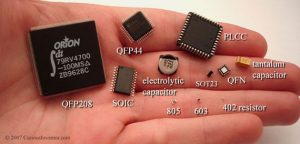
Due to the larger size of through hole components, they are much easier to solder than SMDs. It would be easy to lose a SMD 402 resistor since it is so tiny. Cough on it and it is gone. 🙂
There are a number of different types of solder usage. Electronics, jewelry, and plumbing are some of the most common. But right now we are talking about soldering for electronics. In the electronic soldering category, there are basically two types of solder used, lead and lead free. You can check out what wikipedia says about solder.
As wikipedia notes, lead-free solder widely came into use around July 1, 2006 due to EU directives prohibiting the inclusion of significant quantities of lead in most consumer electronics produced in the EU. In the US, manufacturers may receive tax benefits by reducing the use of lead-based solder. Further more most lead-free replacements for conventional 60/40 and 63/37 tin/lead solder have melting points from 5 to 20 °C higher (that’s 41 to 68° F).
For the past few years when I have had to solder something or the other, I have used lead free solder. The solder that I use is some no name stuff that I got from Banggood in China. I must say that Banggood certainly has been adding more things to list of offerings that appeal to makers and hobbyist.
Not everybody I know likes to use lead free solder. It is harder to use. My friend David said that he has only used lead free solder once and hated it. He only uses tin/lead solder, since he doesn’t have to use the lead free stuff, which has such poor adhesion. The soldering station he uses is a Weller WLC-100 40w unit with adjustable heat, but no thermometer. He uses it on hottest setting as he wants to solder as quickly as possible. He says that the lower the temperature, the longer it takes the soldered area to get hot, which means the temperature gradient is lower into the part, so the part gets hotter. If you do it fast, the part is not yet hot when you take the heat back off. Too slow and the part can overheat and get damaged before you can even solder it. A lot of parts are not very heat sensitive, but some are. So he treat them as if they all are heat sensitive and he has never have any part issues. While he has never had a very good soldering station as he says, he still makes some great stuff using the one he has.

That brings up and interesting point. While the Weller WLC-100 is a popular soldering station and fairly inexpensive at $40 from Amazon, there are better soldering stations available. The Hakko FX-888D 70w unit is better. But it is more expensive costing around $96 at Amazon. Abut two and a half times the cost of the Weller. Note that Weller does have a soldering iron that is comparable to the Hakko FX-888D. It is the WESD51 and it costs around $138 at Amazon. Weller also has the analog version of the WESD51 which is called the WES51 and costs around $98 at Amazon. But the Weller units are only 50w compare to 70w for the Hakko. Hakko does not sell the analog version of their FX-888D. It was discontinued when the FX-888D was released. I have a Hakko FX-888D myself.

The higher wattage of the Hakko along with its high-quality ceramic heating element allows this soldering iron to heat up quickly. It reaches 350 °C (662° F) in just under 1 minute and heats consistently for long periods. This makes it well-suited for big projects that require extended soldering.

While having a Hakko FX888-D won’t make you better at soldering, but it can certainly help. Being able to reliably set the tip temperature is a must I feel, especially when you are using lead free solder. David knows his soldering station well and also has been soldering for long long time. But he also is using tin/lead which adheres a lot better. He can reliable use his technique of setting his Weller station to its max setting, heat the joint quickly, apply the solder, and finish up. It is all about working quickly.
The higher temperature you use will speed the oxidation of your iron’s tip. One source that I came across on the internet mentioned that for the Hakko FX888-D when using lead free solder you will typically have the temperature set between 700 to 725 °F (they use 716 and 725 °F). For tin/led solder the temperature can be set to 650 °F or even as low as 550 °F for most work. But the hotter temperature allows them to get in and out quickly like David does while using his Weller WLC-100. So when using lead free solder you most likely will be running the iron hotter than if you were using tin/lead. That means that you need to need to keep the tip of your iron clean and well tinned. If the tip becomes too oxidized, you won’t be able to keep solder on the tip. The solder won’t wet or flow onto the tip, but it will most likely ball up and fall off. With an oxidized tip you won’t be able to transfer heat to a joint in order to solder. This tip needs some serious cleaning.

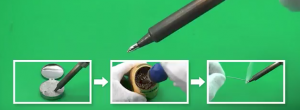
So how do you clean it if it gets like this? Get some tip tinner/cleaner. Have your soldering iron at a normal operating temperature and then wipe the oxidized tip into the little tin containing tip tinner/cleaner for a few seconds until the bright tinning surrounds the working end of the tip. Next wipe of the tip with your cellulose sponge or brass wire sponge. Then reapply solder to the tip. The solder should once again wet or flow nicely on to the tip like when it was new. You are good to go at it again. Make sure you close up your tip tinner/cleaner after you have finished with it. It will dry out if you don’t and will be harder to use. Please note that you should not use tip tinners unless necessary. They will erode the tip plating incredibly fast if used too often. Which is typically any more than once or twice a day. Ideally, you should never use them. You want to maintain a small amount of solder on the tip at all times to prevent the oxidation condition.
So is soldering easy? For the most part it can be. You just need to keep your iron’s tip clean and tinned frequently. Don’t allow your tip to oxidize which will shorten its life. In a nutshell it is all about tip care. You have to get into a set routine while soldering that will allow you to do that. Something like solder a few connections and then clean and tin the tip. Repeat the process. Like in all things, where in order to be good at it, you need to practice.


Place the tip on the joint to heat it up. Note that you must push against the joint with some force. Not much, perhaps on the order of one-half a pound of force. Beginners often just very lightly touch the joint with the tip. Apply the solder to the joint. If the joint is hot enough, the solder will wet or flow onto the joint. Feed the solder into the joint until you have enough to fill any gaps. But don’t over do it since too much is not good. Remove the solder when you have a sufficient amount on the joint. After you have removed the solder, then remove the tip from the joint without shaking or bumping the joint. The whole process from placing the tip on the joint to the removing the tip from the joint can typically take two to 4 seconds. It all depends on a few variable like how much power your iron has and the size of the solder joint.
Typically clean your tip with the brass sponge or cellulose sponge. Then apply solder to the tip and clean the excess off with the brass sponge again.
You might notice while watching soldering howto videos, that the presenter will briefly apply a bit of solder under or near the tip where it touches the pad and the component lead. This creates a thermal bridge that helps in the heat transference from the tip of the iron to the joint. Then they apply the solder to the other side of the component lead or pad. Then they fill the pad with solder like usual.


In the videos I wasn’t exactly sure why they were doing that because from what I had read in the past, you are suppose to heat the joint and not the solder. I guess if the tip isn’t sufficiently wetted, then that creation of the thermal bridge helps.
There are things about the process of soldering that some basic guides don’t mention. Things like sizing the tip to the area of the joint you have to solder. The tips come in different sizes to match the work area. When using copper braid to de-solder joints, you need to make sure the tip is free of oxidation. If it isn’t, then the heat won’t transfer to the wick and the solder from the joint won’t flow into the wick.
This was not intended to be an introduction to soldering. This post is just my observations from trying to get a handle on using lead free solder while soldering.