
What’s the correct temperature to set your soldering station to? I am trying to figure out what temperature presets should I use on my Hakko FX-888D. I can have up to 5 presets.
According to Collin’s Lab Notes, the short answer is for leaded solder to set your iron to 650°F/350°C. And for lead-free solder to set your iron to 750°F/400°C. The long answer is that it depends on two different variables, tip size and joint size. A larger tip is better at transferring heat, so you can use lower temperatures. A smaller tip transfers less heat so you need more heat. On the other side of the equation, a larger joint needs more heat so a higher temperature setting is desirable. A smaller joint heats up faster and it needs less heat, so a lower temperature setting should be used. Keep in mind that higher temperatures affect the life of your soldering iron tips. So when in doubt, use a lower temperature and increase the temperature when needed.
The HAKKO Knowldege Base also provided good information on the different optimal soldering temperatures for leaded solder and lead-free solder. While I am providing the information for the link, I am going to present the information here from the knowledge base. But in a nutshell, the optimal temperature setting should be high enough to achieve a soldering connection at 50°C above the melting point of the solder, while also adding in more heat (70°C to 100°C) for a heat reserve for quick thermal recovery of the tip after a connection is made. This recovery range factors in the performance of the soldering station and type of solder used. Here is a chart for reference on the melting points of various solders.
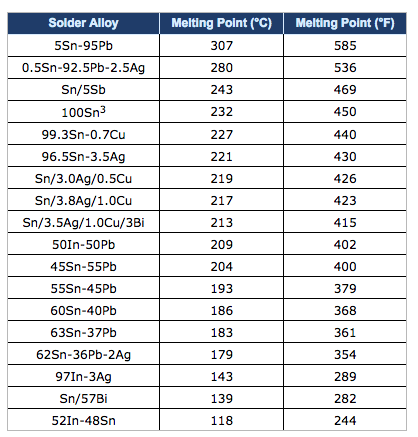
As a general rule of thumb, the optimal soldering temperature should be high enough so that when making a solder connection, the solder is approximately 50°C above its melting point. The set temperature for a soldering station should be an additional 70°C to 100°C higher to provide a heat reserve for the quick thermal recovery of the tip after the solder connection is made. The performance of the soldering station used and the type of solder used will determine the optimal soldering temperature.
For example, lets look at the melting points of common solders:
- Tin/Lead (Sn63/Pb37) – 183°C
- SAC 305 (Sn/Ag3.0/Cu0.5) – 220°C
- SN100 (Sn) – 232°C
Now let’s add the 50°C we need for making a good soldering connection:
- Tin/Lead: 183°C + 50°C = 233°C
- SAC 305: 220°C + 50°C = 270°C
- SN100: 232°C + 50°C = 282°C
We now need to consider the type of soldering station we are using. If we are using a Hakko 936 Soldering Station which has very good performance, we should add approximately 100°C as the heat reserve for quick thermal recovery. The resulting temperature settings are:
- Tin/Lead: 233°C + 100°C = 333°C
- SAC 305: 270°C + 100°C = 370°C
- SN100: 282°C + 100°C = 382°C
As you can see, switching from tin/lead solder to lead-free solder requires a higher optimal temperature setting. But before you raise your set temperature, you must consider the setting you are currently using, and the performance of the soldering station. Most Hakko soldering stations are typically set at about 399°C (750°F). Considering that, the optimal temperature setting does not need to be adjusted when changing from tin/lead solder to lead free solder.
Now let’s look at the optimal temperature settings if we were using a high performace soldering station such as the Hakko FX-951 Soldering Station. Because of the performance of this soldering station and the thermal recovery performance of the composite tips, we only need to add 70°C as the heat reserve for quick thermal recovery. The resulting temperature settings are:
- Tin/Lead: 233°C + 70°C = 303°C
- SAC 305: 270°C + 70°C = 340°C
- SN100: 282°C + 70°C = 352°C
Again, considering that most Hakko soldering stations are typically set at about 399°C (750°F), we do not need to raise the set temperature. In fact, we can use a lower set temperature which will help extend the service life of the soldering iron tip and reduces the risk of damage to the PCB and components.
That wraps up this post.