
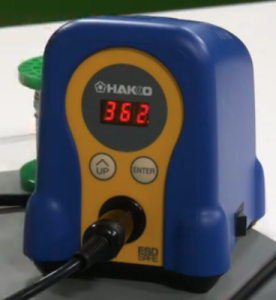
Recently i noticed that Hakko has released a new version of their FX-888D soldering station. The new model is the FX-888DX. The main difference I can see is the addition of single adjustment knob which replaces the two adjustments buttons that the FX-888D had.
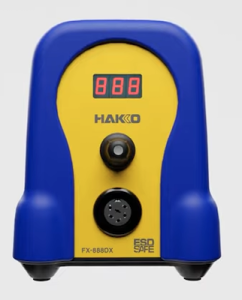 The new model can also use an optional 95w iron for more demanding soldering work.
I have the FX-888D and it is good soldering station. It is 65w and has a temperature range of 120°F to 899°F (50°C to 480°C). The time to reach 660°F (349°C) is 26 seconds. A good soldering station.
I will go through the setup of the FX-888D in order to document the process. There are a four parameters that you can change in the setup . You can choose either Celsius or Fahrenheit as the display temperature. You can set a base temperature so that an alarm will sound if the station doesn’t go pass this value. You can choose between normal mode or preset mode. Preset will allow you to set a number of different temperature presets. And the last thing is setting a password. This probably could be useful to people.
In order to get into the parameter settings, press and hold the UP button while turning on the FX-888D. Let the button go when the display lights up. Next 01 will flash to indicate that you at Preset 01. Press the Enter button to allow you to set the display temperature scale to either Celsius (C) or Fahrenheit (F). Pressing the UP button will cycle through C and F. By pressing the Enter button, you will set your chosen temperature scale. The 01 will be flashing again. Press the UP button to go to the next Parameter which is 03.
Parameter 03 is to set a base temperature so that an alarm will sound if the station doesn’t go pass this base value after a certain time. We can press the Enter button to go into this mode to set the desired value. Using the UP button and the Enter button will allow us cycle through the digits to set the desired value. Pressing the UP button at the flashing parameter number takes us to the next parameter.
Parameter 11 is next and it allows us to choose between normal mode or preset mode. Normal mode is 0 and preset is 1. Normal mode just has one preset temperature wile Preset mode will allow you to set a number of different temperature presets, up to 5. We don’t each preset temperature value here, we just set the number of presets.
Parameter 14 is next and it is about setting a password. This probably could be useful, but I am not going to use it and not going to describe it here.
When we are done changing the parameters that we want, we press and hold the Enter button for a second. A Y will flash on the display. If we want to save the values, we will press enter again. If we hadn’t wanted to save the values, when the Y was flashing, we would have pressed the UP button to cycle through to a flashing N. Then we would have pressed the Enter button to not save the changes.
How to change your set or preset temperatures. For example if the default set value was 750 and you wanted to set it to 660. First press and hold the Enter button. The hundreds digit on the display will begin to flash. You will use to UP button to cycle through to the digit value you want. In our example the 7 is flashing and I would press the UP button, scrolling through until the 6 is displaying. Press the Enter button to move over to the tens digit. Press the UP button to scroll through to the desired value. Press the Enter button to move over to the ones digit. Make a change to this value if needed by using the UP button. Then press the Enter button to finish.
This will work for if you have a number of presets. For the presets you will use the UP button to select the various presets, P1, P2, etc. up to P5 if you have 5. Press the Enter button to set the iron temperature to the preset that you have chosen. When it heats up to its value, you can do the change as described prior.
From time to time you probably want to dial in or adjust the set temperature on your FX-888D, so that it will be more accurate. You will need a way to measure the temperature of your tip. There are tip temperature measurement tools. Hakko has the SG-100B. With the iron on and it is at its set temperature, measure the tip temperature with the tool. Once you do that, you will press and hold the UP button on the FX-888D to get into adjustment mode. Then you set the value to the temperature that you measured with the tip temperature measurement tool. The UP button will cycle through the digits. The Enter button will take you to the next digit and will also exit when you are at the 1s digit.
If for some reason, you made mistakes when you made your changes, you might want to do a factory reset. Here is how to do a factory reset on your FX-888D. When the power is off, press and hold both the UP and Enter buttons. Turn on the power. When the power comes on your will get a flashing A which means Asia.
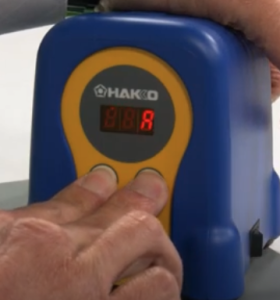
Press the UP button one time to get a flashing U which means US. Press the Enter button to choose this selection. The FX-888D has been reset to its factory settings.
Here are the video links where I got my information from. There is no guarantee that any video that I link to will be available later, so I tried my best to document the information.
FX-888D Setting and Adjustments document.
Here is a very short video by Hakko on the parameter settings on your Hakko FX-888D.
Here is another video where we are shown how to set the different parameters.
Here is a video by Hakko on setting the Preset Temperatures.
Here is a short video by Hakko on setting the Temperature on your FX-888D.
Here is a short video by Hakko on using the Adjust mode.
How To Set and Use the Password Lockout Feature on your FX-888D.